

After School DMA Parent Options (DMA)
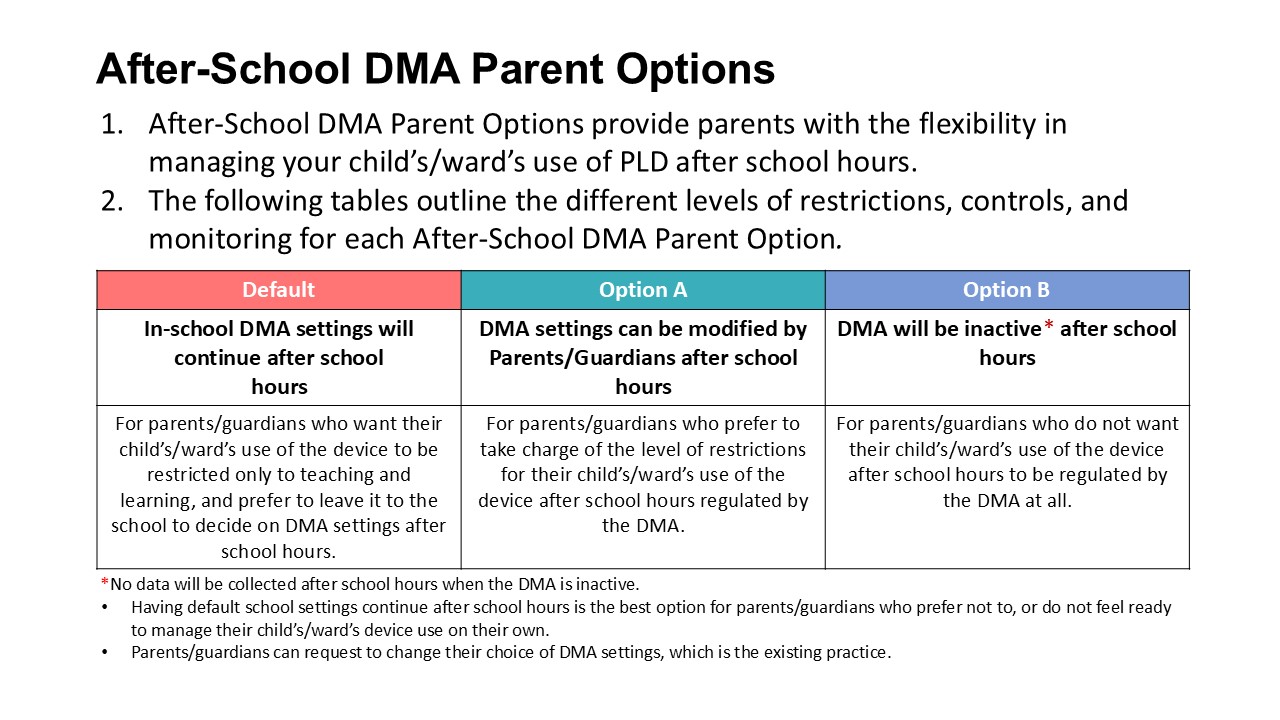
After- School Device Management Application (DMA)
All PLDs will be pre-installed with a Device Management Application (DMA). The DMA software is installed in students’ PLDs to provide a safer digital learning environment, and to prevent misuse of the device. The DMA has a variety of functions that will support the use of the PLD in the classroom, as well as safeguard students’ cyber-wellness. The DMA has 3 main components:
-
Classroom Management Service. This enables teachers to actively monitor and control students’ use of the PLD during lesson time to improve student management and deliver effective teaching.
-
Mobile Device Management Service. This facilitates the remote deployment of teaching and learning applications and comes with security patches. The school may also leverage on the Mobile Device Management Service to install teaching and learning resources.
-
Usage Management Service. This allows the school to address cyber-wellness concerns, such as excessive and inappropriate use of the PLD and manage prolonged use of the PLD to reduce stress on the eyes.
Parents/guardians can choose between these 3 DMA After-School Parent Options to suit their preferences for managing the PLDs after school hours. Parents can request to change their choice of DMA option by submitting this form: https://go.gov.sg/krparentdma. The request will be processed by the school at the end of every month.
Cyber-wellness
The school has in place measures to enable a safe and seamless learning
environment for students. Parents play a key role in partnering the school
to support their child.
-
Educating students on Cyber-Wellness and Digital Literacies. MOE has made significant changes to the Character and Citizenship Education (CCE) curriculum. Cyber-Wellness lessons will feature significantly in the CCE2021 lessons. Students will also continue to learn to be respectful, safe, and responsible users of technology through various student learning experiences.
-
Device Management Application (DMA). The DMA plays an important role in helping the school to safeguard students’ cyber-wellness by:
-
collecting data on usage by the student, such as the amount of time spent on each application,
-
monitoring, filtering and limiting the type of websites accessible to the student, and
-
placing restrictions on students’ screen time in order to prevent cyber addiction.
-
-
Acceptable Use Policy (AUP). The AUP helps to establish a common understanding of what constitutes an acceptable and appropriate use of the PLD, so as to enable a conducive learning environment. Parents could refer to the AUP when helping to manage their child’s use of the PLD.
Roll-Out of IT Applications as part of the NDLP
As part of the NDLP, schools will progressively roll out IT applications
that will be vital to students’ learning experience and educational journey.
The school will roll out some or all of the following applications:
-
Student iCON (Google Workspace): Every secondary school student will be provided with access to the Google Suite set of tools, including email address.
-
Microsoft 365 Pro Plus: Every secondary school student will be able to use Microsoft Office tools that include Word, PowerPoint, and Excel.
The school may also choose to roll out applications other than those listed above. The school may need to use your child’s/ward’s personal data such as his/her full name, class and Student iCON ID to set up user accounts.